Ein Scan.
Ein Blick.
Ein Name.One scan.
One glance.
One name.
Mit AUTARC ID meldet sich jede Person an einem geteilten Gerät selbst an: persönlichen QR-Code scannen, kurz in die Kamera schauen. In unter drei Sekunden, auch ohne Netz. Jede Buchung trägt danach den richtigen Namen.With AUTARC ID every person signs in on a shared device as themselves: scan the personal QR code, glance at the camera. In under three seconds, even offline. Every transaction then carries the right name.
- Einfach am Gerät: kein Passwort, geht mit Handschuhen und ohne WLANSimple at the device: no password, works with gloves and without Wi-Fi
- Passt zu Ihrer Umgebung: SureLock, Ihre bestehenden Apps, Microsoft Entra IDFits your setup: SureLock, your existing apps, Microsoft Entra ID
- Lokaler Support: entwickelt und betrieben von Barcotec in SalzburgLocal support: developed and operated by Barcotec in Salzburg
Vereinbaren Sie eine kurze Vorführung per Videoanruf. Wir zeigen Ihnen in etwa 30 Minuten die Anmeldung an einem Mobilen Computer, die Ausgabe der QR-Codes und das Protokoll in der Konsole.Book a short demo by video call. In about 30 minutes we show you the sign-in on a mobile computer, how QR codes are issued and the log in the console.
Die einen müssen sich beweisen.
Die anderen werden angenommen.Some have to prove who they are.
The others are simply assumed.
Wer am Schreibtisch arbeitet, meldet sich mit MFA an, bevor er die erste Mail öffnet. Wer im Lager, in der Produktion oder auf der Station arbeitet, meldet sich mit einem Sammelkonto an. Dabei passiert dort die eigentliche Arbeit.Desk workers sign in with MFA before they open their first email. People in the warehouse, on the line or on the ward sign in with a shared account. Yet that is where the actual work gets done.
Wenn später jemand wissen will, wer eine Fehlmenge angenommen oder einen Bestand korrigiert hat, gibt es keine Antwort. Und wenn doch ein Name drinsteht, hat ihn vielleicht ein Kollege beim Schichtwechsel „nur schnell“ eingetippt. Ein Passwort kann man weitergeben. Ein Gesicht nicht.When someone later needs to know who accepted a shortage or corrected a stock level, there is no answer. And if there is a name, a colleague may have typed it in “just quickly” at shift change. You can hand over a password. Not your face.
„Seit über 35 Jahren bringen wir Mobile Computer in Lager, Filialen und Produktionen. Am Büro-PC ist jede Anmeldung doppelt abgesichert, am Gerät draußen klebt nicht selten ein Zettel mit dem Passwort. Diesen Gegensatz wollten wir nicht länger hinnehmen.““For over 35 years we have been bringing mobile computers into warehouses, stores and production. At the office PC every sign-in is secured twice; out on the device there is quite often a note with the password. We were no longer willing to accept that gap.”
Vom Schichtbeginn bis zur Übergabe – jede Buchung mit NamenFrom the start of the shift to handover – every transaction with a name
Einmal am TabletOnce, on the tablet
Mit AUTARC Enroll ein Foto aufnehmen und den persönlichen QR-Code erzeugen – für Firmenausweis, Aufkleber, Papier oder das eigene Handy.Take a photo with AUTARC Enroll and create the personal QR code – for the company ID, a sticker, paper or the worker’s own phone.
Scannen und kurz hinschauenScan and glance
Das Gerät prüft, ob das Gesicht zum Code passt. Klappt es einmal nicht, gibt die Schichtleitung die Anmeldung am eigenen Handy frei.The device checks that the face matches the code. If it doesn’t work once, the shift lead approves the sign-in on their own phone.
Ihre Apps unter dem richtigen NamenYour apps under the right name
Über SureLock, über Robot Finger für Apps ohne Single Sign-on oder über Microsoft Entra ID.Via SureLock, via Robot Finger for apps without single sign-on, or via Microsoft Entra ID.
Abmelden, Gerät freiSign out, device free
Nach Zeit oder per Knopf. Angebundene Apps werden mit abgemeldet.After a set time or at the push of a button. Connected apps are signed out too.
Echte Aufnahmen der App:Real recordings of the app:
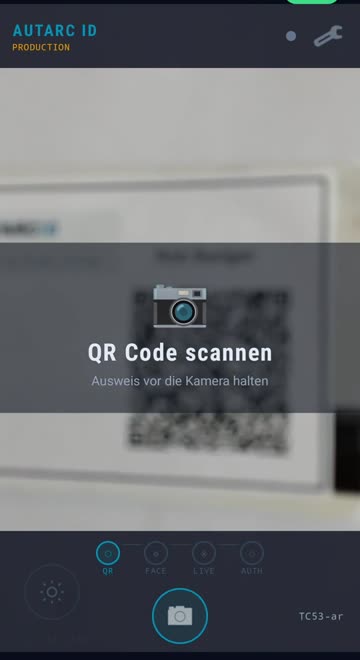
ScannenScan
Den persönlichen QR-Code: auf dem Firmenausweis, einem Aufkleber, Papier oder auf dem eigenen Handy.The personal QR code: on the company ID, a sticker, paper or on the worker’s own phone.
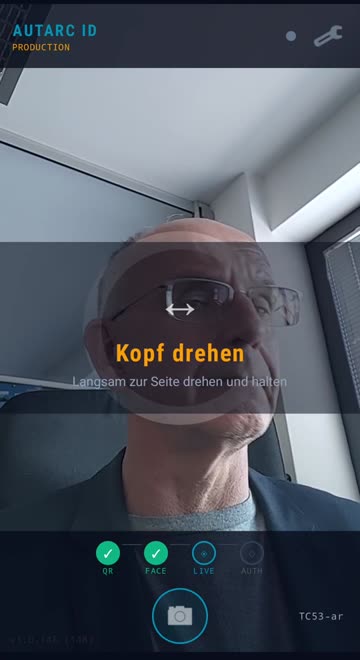
Kurz hinschauenGlance at the camera
Ein Blick, live geprüft, direkt auf dem Gerät.One glance, checked live, on the device itself.
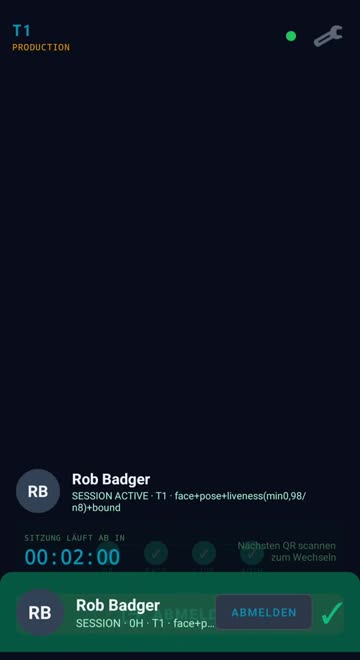
LoslegenGet going
Angemeldet, mit Namen, in Ihren Apps.Signed in, by name, in your apps.
Was Sie bekommenWhat you get
External MFA ohne DiensthandyExternal MFA without a company phone
Microsoft stellt die eigenen SMS-Codes ab 1. Februar 2027 ein. Als External MFA ist AUTARC ID davon nicht betroffen. Voraussetzung sind Entra ID P1 und ein Entra-Konto pro Person.Microsoft stops sending its own SMS codes from 1 February 2027. As External MFA, AUTARC ID is not affected. Requires Entra ID P1 and an Entra account per person.
Im Microsoft Marketplace ansehen →View on Microsoft Marketplace →
Quelle zur SMS-Abschaltung:Source on the SMS retirement: learn.microsoft.com
Android 10 bis 17Android 10 to 17
Mobile Computer und Rugged Smartphones mit Frontkamera. Ob Ihre Geräte passen, prüfen wir gerne mit Ihnen.Mobile computers and rugged smartphones with a front camera. We’re happy to check with you whether your devices fit.
Konsole für die ITConsole for IT
Mitarbeitende, QR-Codes und Geräte verwalten, Codes sperren, Protokoll exportieren. Gesperrte Codes übernehmen die Geräte beim nächsten Abgleich.Manage workers, QR codes and devices, block codes, export the log. Devices apply blocked codes at their next sync.
Fünf Apps, ein SystemFive apps, one system
AUTARC ID am Gerät, Enroll für die Ausgabe, Supervisor für die Schichtleitung, die Konsole für die IT und der Scanner, der die Geräteflotte auf riskante Apps prüft.AUTARC ID on the device, Enroll for issuing, Supervisor for shift leads, the console for IT, and the Scanner, which checks the device fleet for risky apps.
Keine GesichtsdatenbankNo face database
Die Gesichtsvorlage steht verschlüsselt im persönlichen QR-Code. Vorlagen für Folgenabschätzung und Betriebsvereinbarung gibt es auf Anfrage.The face template is stored encrypted in the personal QR code. Templates for the impact assessment and the works agreement are available on request.
Im TestbetriebIn test operation
Ihr nächster SchrittYour next step
Von der Geräteauswahl bis zum laufenden Betrieb: Wir richten AUTARC ID auf Ihren Geräten ein, geben die QR-Codes aus und begleiten den Start an einem Standort. Ihr Barcotec-Ansprechpartner oder sales@barcotec.at · Salzburg +43 662 424 600 · Wien +43 1 786 39 40From choosing devices to day-to-day operation: we set up AUTARC ID on your devices, issue the QR codes and support the start at one site. Your Barcotec contact or sales@barcotec.at · Salzburg +43 662 424 600 · Vienna +43 1 786 39 40